Opis
Lightweight plugin that adds additional inspector controls to block editor blocks that allow to animate the block once it becomes visible to the user during scrolling. The controls can be used to select an animation type (fade, flip, slide, zoom), variation (different directions), as well as delay, duration and more advanced settings. Upon changing an option the animation can be immediately previewed in the editor.
This plugin uses AOS – Animate on scroll library and adds its’ stylesheet (2.8 kB) and script (5.2 kB) to the front end as well as a script that initializes the animations (1.3 kB).
Snimke zaslona
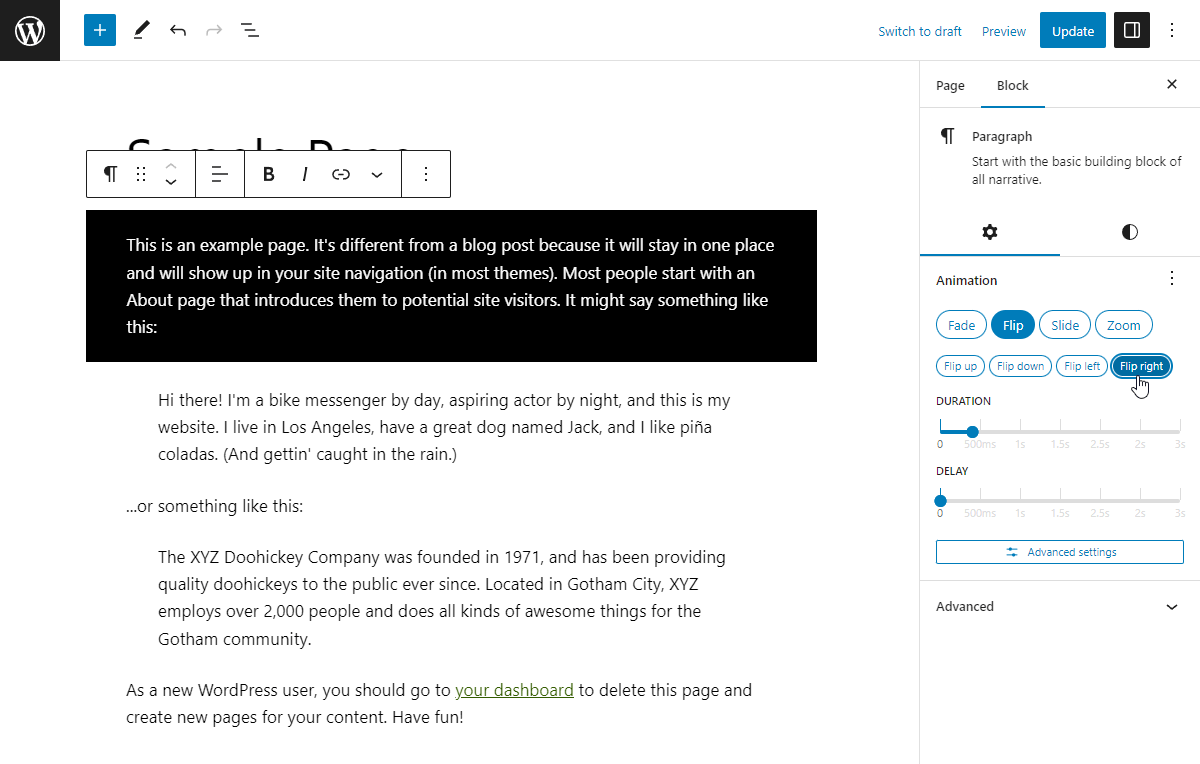
Adding an animation 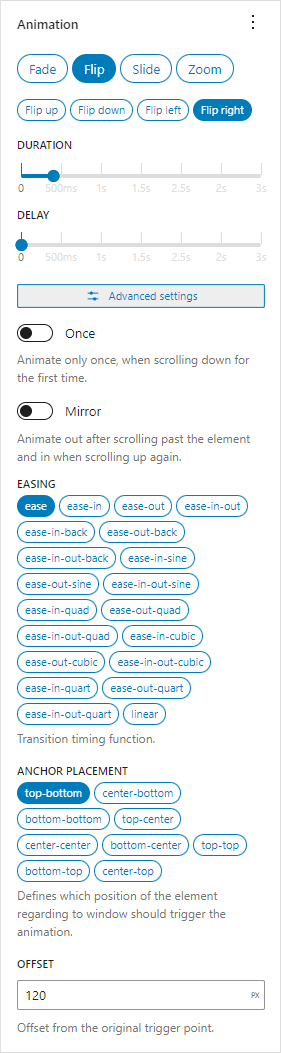
Animation controls
Instalacija
Install via admin dashboard
- Go to your WordPress admin dashboard -> Plugins.
- Click “Add New”.
- Click “Upload Plugin”.
- Select the
animations-for-blocks.zipfile. - Click “Install Now”.
- Activate the plugin from WordPress admin dashboard -> Plugins.
Manual install via FTP upload
- Upload the folder “animations-for-blocks” from
animations-for-blocks.zipfile to your WordPress installations../wp-content/pluginsfolder. - Activate the plugin from WordPress admin dashboard -> Plugins.
ČPP
-
How do I add an animation?
-
In your selected block’s inspector controls (block settings) open the “Animation” panel and select an animation. The current block should display a preview of the selected animation and further options related to that animation will become available below.
-
How does it work?
-
Animations for Blocks plugin works by using the Animate on Scroll (AOS) library that is mostly CSS based with some JavaScript to handle initialization. The plugin adds attributes to block’s root element that tell the AOS library how to animate it. Loading the necessary styles and scripts is also handled automatically by the plugin.
-
Does it work for all blocks?
-
It should work with normal blocks that render a valid WP Element that can utilize the
blocks.getSaveContent.extraPropsfilter as well as dynamic blocks that utilize arender_callback. Third party blocks that do something unorthodox may not work.
Known unsupported blocks -
Disable block support
-
The
anfb_unsupported_blocksfilter can be used in your child theme’sfunctions.phpfile to disable block animation support.add_filter('anfb_unsupported_blocks', function($blocks) { $blocks[] = 'core/button'; return $blocks; }); -
What happens when I disable this plugin?
-
After disabling this plugin blocks with animations can become invalid. From there you can attempt to recover the block by clicking “Attempt Block Recovery” which should remove the custom animation attributes. If you don’t want to risk blocks becoming invalid you need to disable all animations before disabling the plugin.
-
All the animated elements are invisible on the front end
-
When none of the animated elements show up on your site it’s possibly due to a JavaScript error preventing the initialization of AOS. Please open the Developer Tools (F12 on Chrome/Firefox) and look for any errors in the Console tab. You can contact support with the error message, include your site link if possible.
Recenzije


Suradnici i Programeri
“Animations for Blocks” je softver otvorenog koda. Sljedeće osobe su doprinijele ovom dodatku.
Suradnici
“Animations for Blocks” je prijeveden na 1 dijalekt. Zahvala prevodiocima za njihov doprinos.
Prevedite “Animations for Blocks” na svoj jezik.
Zainteresirani ste za razvoj?
Pregledajte kôd, pogledajte SVN spremišteili se pretplatite na dnevnik razvoja od RSS.
Dnevnik promjena
1.1.5
- Tested up to WordPress 6.5.
- Added option to choose where to display the animation controls – you can move them to the “Styles” tab or to “Advanced” inspector controls area.
- Update
@wordpress/*packages.
1.1.4
- Accidentally a version.
1.1.3
- Fix for crash with latest Gutenberg plugin due to
__unstableElementContextbeing removed. - Update
@wordpress/*packages.
1.1.2
- Add option to disable automatic animation preview.
- Add option to lazyload assets when an animated block is preset on the current page.
- Update
@wordpress/*packages. - Update screenshots.
1.1.1
- Use
WP_HTML_Tag_Processorfor adding HTML attributes. - Blocks that render multiple root elements are no longer wrapped automatically. Use Animation container block to do it.
- Move all PHP code to main file for simplicity.
1.1.0
- Animation preview works in iframe-d block editors.
- Rework controls.
- Add ability to copy-paste animation settings.
- Update Animation container block to API version 2.
- Use
render_blockfilter to apply animation attributes instead of overriding block’srender_callback. - Add
anfb_aos_attributesfilter that can modify attributes that are added to animated HTML elements. - Convert some code to typescript.
- Update
@wordpress/*packages. - Test with WordPress 6.2-RC1.
1.0.6
- Fix
onceandmirroroptions detection in dynamic blocks. - Update
@wordpress/*packages. - Test with WordPress 6.1.1.
1.0.5
- Update
@wordpress/*packages. - Test with WordPress 6.0.
- Add GitHub link.
- Remove
srcfolder from plugin.
1.0.4
- Update block anchor selector.
1.0.3
- Use generated version number for AOS library.
1.0.2
- Fix encoding for dynamic blocks.
1.0.1
- Add more unsupported blocks.
- Move Animation Container block to “Design” category.
1.0.0
- Initial release.