

Opis
Pagalo – WooCommerce Payment Gateway
If the transaction is successful the order status will be changed to “processing”. If the payment charge failed the order status will be changed to “cancelled”. If something is wrong with the connection between your server and the Pagalo server the order status will be changed to “on-hold”. After successful transaction the customer is redirected to the default WP thank you page.
Support
Use the wordpress support forum for any questions regarding the plugin, or if you want to improve it.
Get Involved
Looking to contribute code to this plugin? Go ahead and fork the repository over at GitHub.
(submit pull requests to the latest “release-” tag).
Usage
To start using the “Pagalo – WooCommerce Payment Gateway”, first create an account at Pagalo.co. They will provide you with your account “IdenEmpresa”, “Token”, “Private key” and “Public Key”.
After you have your Pagalo or sandbox account active:
- Head to Woocommerce Settings and click on the Checkout tab.
- On checkout options you should see the option “Pagalo”, click on it.
- Enable the payment gateway byt checking the checkbox that reads “Enable this payment gateway”.
- Fill the form with your account information. Don’t forget to check the “Enable Test Mode” box if your account is from the sandbox.
- Click on save changes and you should be ready to start accepting credit cards with Pagalo.
Snimke zaslona

The Pagalo payment gateway settings page showing the texts and description that can be customized.
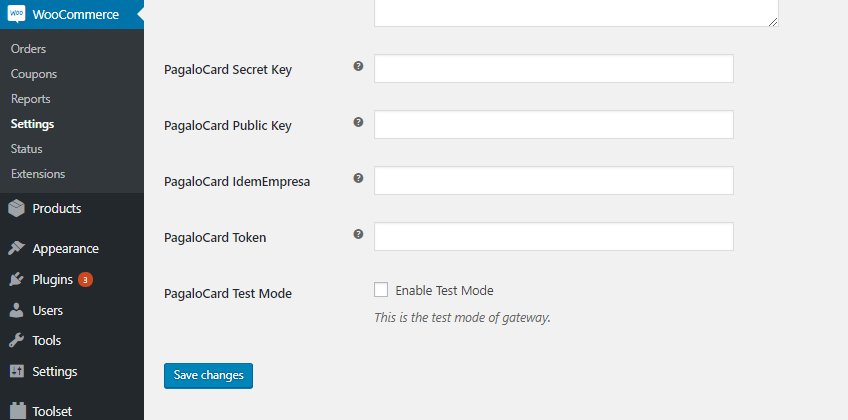
The Pagalo payment gateway settings page showing the fields that need to be filled with each individual account information.

The checkout page with the pagalo payment credit card form.
Instalacija
Installing “Pagalo – WooCommerce Payment Gateway” can be done using the following steps:
- Download the plugin.
- Upload the ZIP file through the “Plugins > Add New > Upload” screen in your WordPress dashboard.
- Activate the plugin through the ‘Plugins’ menu in WordPress
Pitanja i odgovori
-
How do I contribute?
-
We encourage everyone to contribute their ideas, thoughts and code snippets. This can be done by forking the repository over at GitHub.
Recenzije


Suradnici i Programeri
“Pagalo – WooCommerce Payment Gateway” je softver otvorenog koda. Sljedeće osobe su doprinijele ovom dodatku.
Suradnici

“Pagalo – WooCommerce Payment Gateway” je preveden na 5 jezika. Zahvala prevoditeljima za njihov doprinos.
Prevedite “Pagalo – WooCommerce Payment Gateway” na svoj jezik.
Zainteresirani ste za razvoj?
Pregledajte kôd, pogledajte SVN spremišteili se pretplatite na dnevnik razvoja od RSS.
Dnevnik promjena
2.1.1
-
- Send identifier(nit) to the V2 api client information.
-
- Update WordPress Version suppot tag
2.1.0
-
- For advanced discounts that don’t substract the discount to every product, we added an option to send a single product to pagalo(with the order Total) instead of full order details.
2.0.0
-
- Add support for Pagalo V2 and installments
1.2.2
-
- Add more detailed notices for both clients and websites admins.
1.2.1
-
- Remove unnecesary messages when payment fails.
1.2.0
-
- Add support for Woocommerce compatibility check.
-
- Go back to WP API instead of Curl
1.1.1
- Go back to using Curl isntead of WP API due to problems with multicurrency(will keep testing and go back to WP API once its fully functional for multi-currency)
- Reorder the post fields on wordpress settings page to match the orther they are displayed on the Pagalo platform.
1.1.0
- Add banner and icon images
- Add readme.txt file
1.0.0
- Integration with Pagalo to acept credit card payments.