

Opis
Search by GOGO GET lets visitors ask in plain language and see live results as they type. Published pages, posts, and WooCommerce products are included. In WP Admin you can see what people search, which queries return nothing, and how often they click a result.
Live results
Results update as the visitor types, with richer cards, a category filter, and share links. Place search as a site-wide side tab or inside a page.
AI-powered search
GOGO builds keywords and descriptions when the site is scanned. Where AI mode is enabled on your plan, visitors can ask a question in plain language inside the search box.
WooCommerce products
When WooCommerce is active, published products are indexed with the rest of the site and can show an image and price in results.
Two ways to add search
* Floating search — a site-wide side tab visitors can open from any page
* In-content — shortcode [gogo_search type="bar"] / [gogo_search type="icon"] or the GOGO Search Gutenberg block
Pages and Category Manager
Review indexed pages (keywords, boost, active state), upload page previews, and organize hierarchical categories — all for this site, in WP Admin.
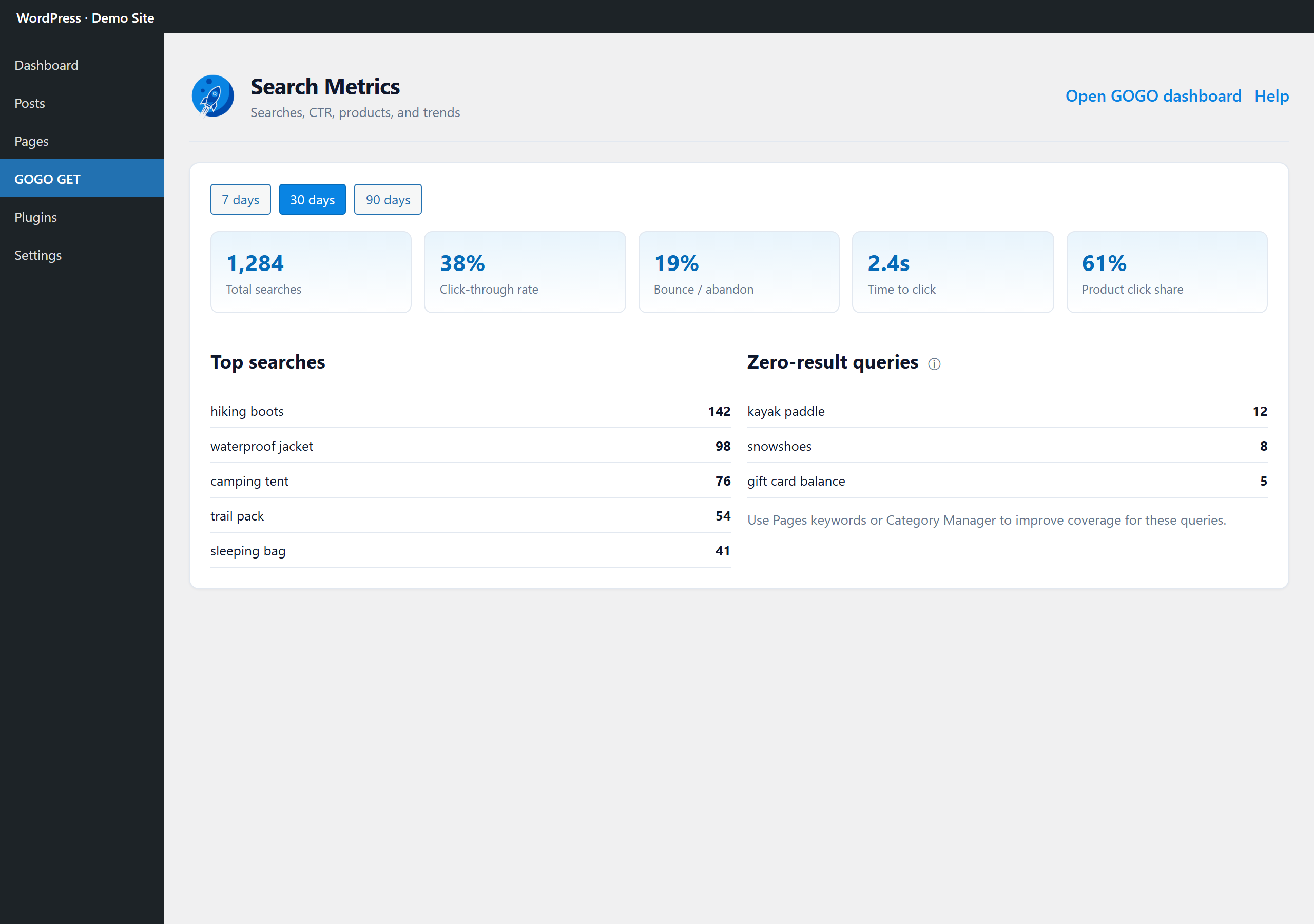
Search Metrics
See what visitors search, zero-result queries, and (on supported plans) product metrics — without leaving WordPress.
Connect with GOGO
Sign in with email or Google to link this WordPress site to your GOGO organization. Day-to-day search setup stays in WP Admin. Billing and multi-site management stay in the GOGO portal when needed.
Learn more: https://gogoget.ai
Snimke zaslona



Blokovi
Ovaj dodatak omogućava 1 blok.
- GOGO Search
Instalacija
- Install and activate the plugin from wordpress.org or upload the zip.
- Open GOGO GET in WP Admin and connect your account (sign in or sign up).
- Complete guided setup: Scan Configure Apply.
- Choose Floating or In-content under Search Setup.
- For in-content: add
[gogo_search type="bar"]or the GOGO Search block where you want search to appear.
Pitanja i odgovori
-
How is this different from the built-in WordPress search?
-
WordPress search matches keywords and lists results by date. Search by GOGO GET returns live results as visitors type, can answer in plain language when AI mode is on, and includes published pages, posts, and WooCommerce products.
-
Do I need a GOGO account?
-
Yes. Open GOGO GET in WP Admin and sign in or create an account with email or Google. After that, search setup and metrics for this site stay in WP Admin. Billing and additional sites stay in the GOGO portal.
-
Floating vs in-content — which should I use?
-
Floating is a site-wide side tab on every page. Use in-content (shortcode or the GOGO Search block) when you want search in a specific place, such as the header.
-
Are WooCommerce products included?
-
Yes. Published WooCommerce products are sent with your pages and posts when the site is scanned, and they can appear in live results with an image and price. Your theme’s own product search box still uses WordPress search until visitors use the GOGO bar or floating tab.
-
Do I need to paste an API key?
-
No. After you connect, floating search and the block or shortcode use your linked GOGO configuration.
-
What is AI mode?
-
Where it is enabled on your plan, visitors can ask a question in plain language. Crawl-time AI still improves keywords and descriptions when AI mode is off.
-
Where do Search Metrics appear?
-
In the GOGO GET Search Metrics admin page. Deeper charts are in the GOGO portal. Product metrics appear on supported plans.
-
Can I manage multiple sites?
-
This plugin manages the current WordPress site. Other sites in your GOGO organization are managed in the GOGO portal Site Manager.
Recenzije
Nema recenzija za ovaj dodatak.
Suradnici i Programeri
“Search by GOGO GET – AI Live Site Search” je softver otvorenog koda. Sljedeće osobe su doprinijele ovom dodatku.
Suradnici
Prevedite “Search by GOGO GET – AI Live Site Search” na svoj jezik.
Zainteresirani ste za razvoj?
Pregledajte kôd, pogledajte SVN spremišteili se pretplatite na dnevnik razvoja od RSS.
Dnevnik promjena
1.3.4
- Clear the search term when dismissing results (click-away, Esc, or closing the icon dialog).
1.3.3
- Pages editor: Active toggle uses activate/deactivate so search index stays in sync; boost clamped to 0–5 (Azure scoring range); clearer keywords vs boost help text.
1.3.2
- In-content search: live full results as you type (matches floating search), richer result cards, category filter, share links, and visitor AI toggle when enabled.
1.3.1
- Search Metrics: AI vs keyword search counts.
- Inline widget analytics: AI searches log refined keywords + aiMode (not the full question).
1.3.0
- Guided Overview setup (Scan Configure Apply) with Connect (Auth0 / Google SSO).
- Floating search or in-content shortcode / Gutenberg block.
- Pages and Category Manager in WP Admin (this site).
- Search Metrics with KPI tooltips and product metrics on supported plans.
- Expanded Directory description, tags, and FAQ for discoverability.
1.0.3
- Prior Directory release.