
Opis
Login Intelligence helps WordPress administrators understand how users access their websites by providing clear, actionable insights into authentication velocity, account engagement, active sessions, and local security signals.
All functionality runs entirely on your WordPress server using deterministic database queries and transient caching. There is zero third-party cloud tracking, zero external API dependencies, no automated user lockouts, and no paywalls.
Key Features
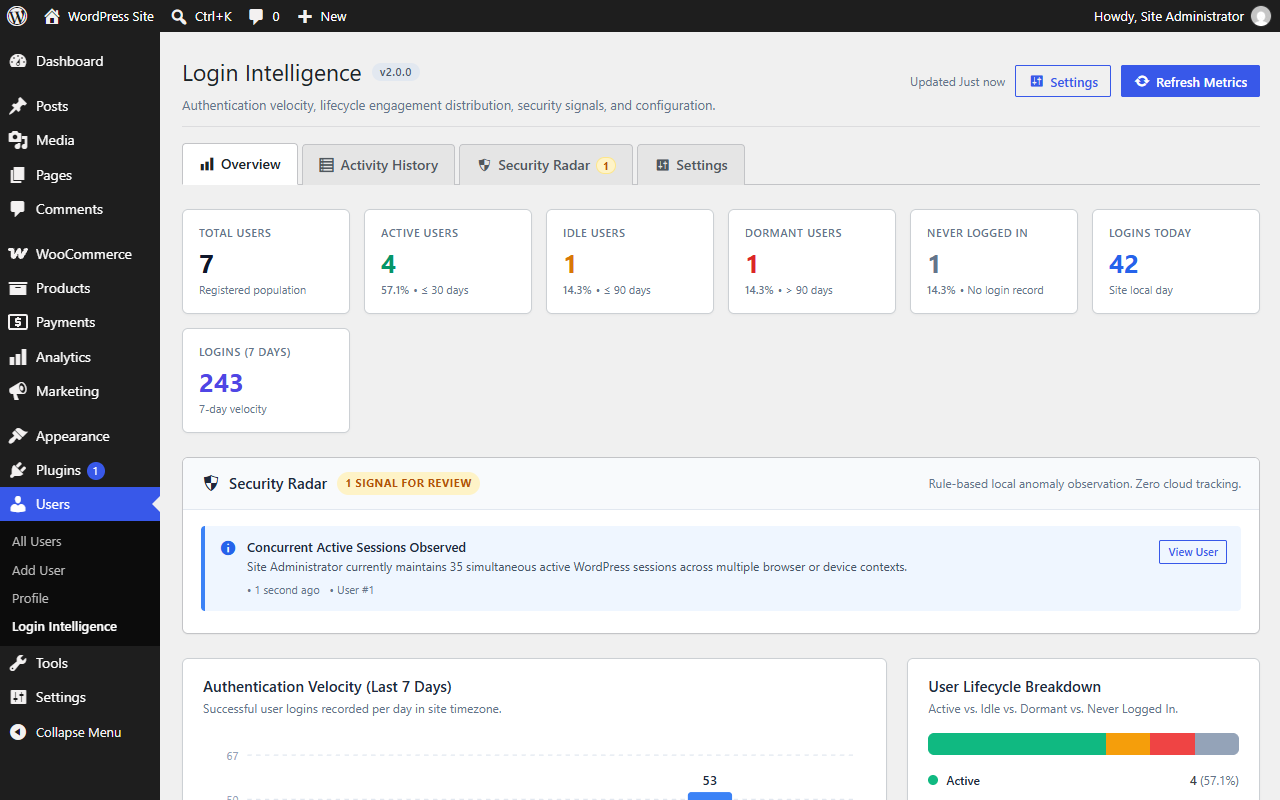
- Overview Dashboard: Centralized view of authentication velocity, 7-day login volume trends, and user lifecycle distributions.
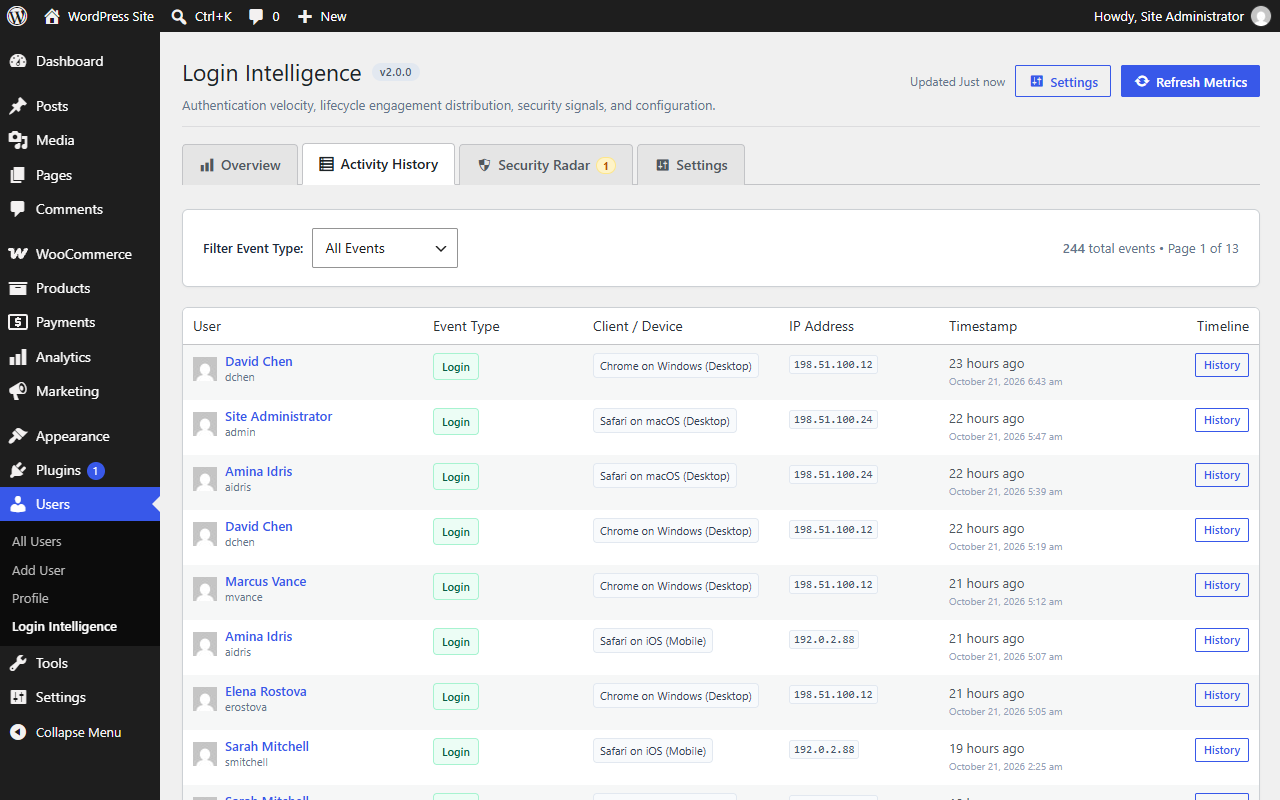
- Activity History: Complete event stream capturing successful logins, failed attempts, and logouts with pagination and event type filters.
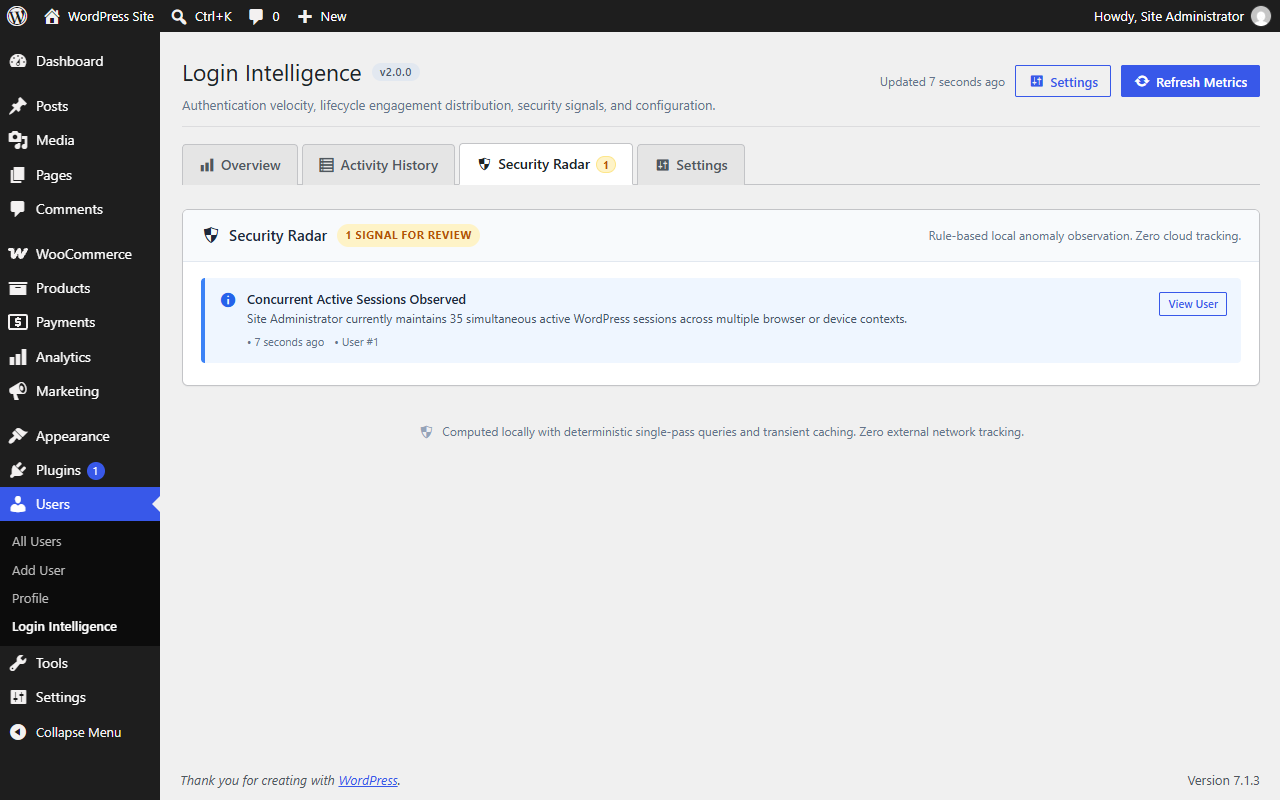
- Security Radar: Rule-based local anomaly detection highlighting failed login surges, concurrent sessions across devices, dormant account reactivations, and new browser contexts.
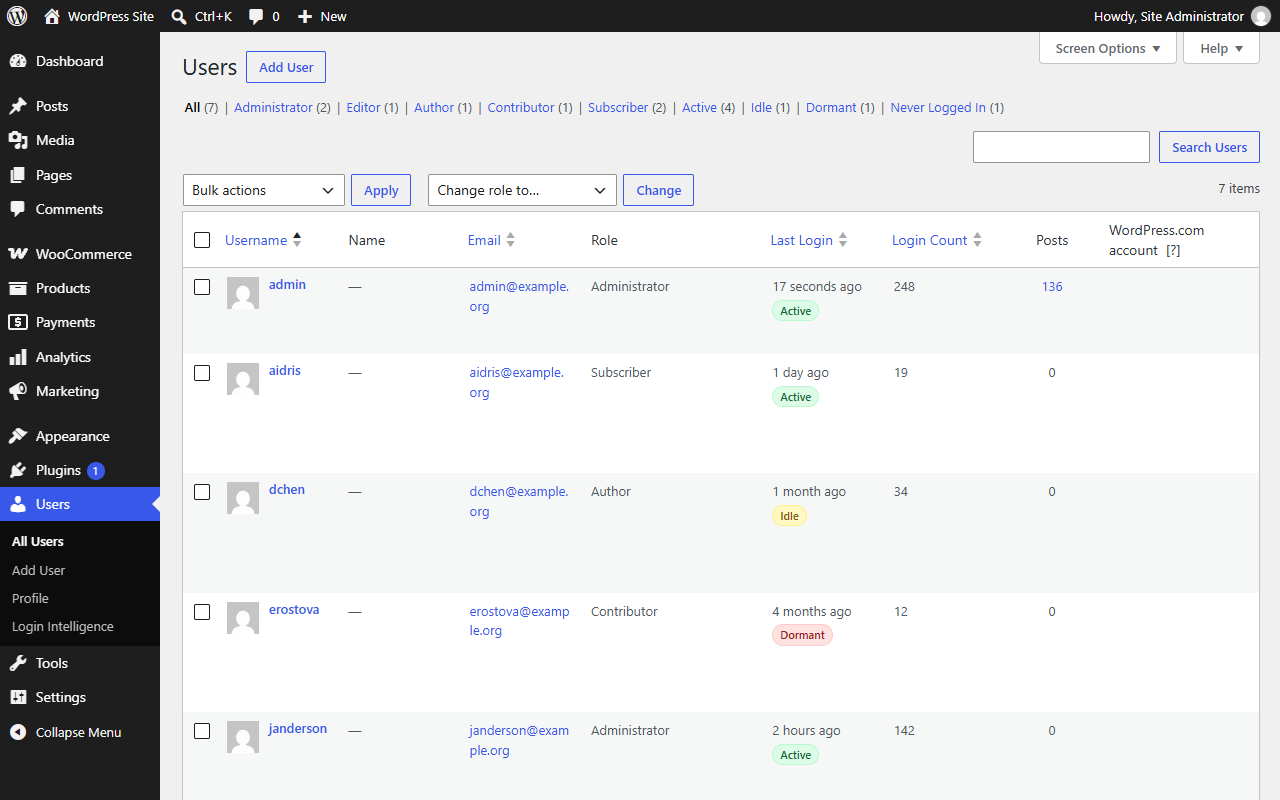
- User Lifecycle State Engine: Automatically categorizes accounts into Active, Idle, Dormant, and Never Logged In with color-coded badges and native Users list table filter tabs.
- Session Intelligence & Device Context: Inspect active sessions with parsed browser, operating system, and device type without intrusive client-side fingerprinting.
- Synchronized Dual-Write Engine: Fast user metadata caching for immediate administrative sorting paired with a dedicated append-only
wp_llid_eventsdatabase table for historical auditing. - User Profile Activity Timeline: View individual user authentication history directly on the user profile edit screen with efficient cursor pagination.
- Automated Data Retention: Scheduled daily WP-Cron pruning maintains a lean database footprint according to your configured retention schedule.
- Privacy by Design: On-premise event storage, IP address anonymization options, and full integration with WordPress Core Personal Data Exporter and Eraser tools.
- Multisite Compatible: Works seamlessly on single-site WordPress installations and across WordPress Multisite networks.
- 100% Free: No Pro tiers, paid add-ons, license keys, or upsell notices.
How It Works
- Authentication Monitoring: When a user attempts to log in or log out, Login Intelligence captures the event via WordPress core authentication hooks (
wp_login,wp_login_failed, andclear_auth_cookie). - Dual-Write Storage: The plugin updates the user’s metadata summary (last login time, login count, IP, and user agent) for instant sorting in the WordPress Users table, while appending a structured event record to the dedicated
wp_llid_eventscustom table. - Local Signal Detection: Security Radar calculates authentication velocity directly from local database queries, comparing recent event frequencies against configurable thresholds (such as 5 failed attempts within 15 minutes or logins from multiple concurrent IPs).
- Advisory Feedback: Security Radar provides purely observational, advisory signals. It never blocks, throttles, or locks out users automatically, preserving administrative control and preventing accidental lockout of legitimate users.
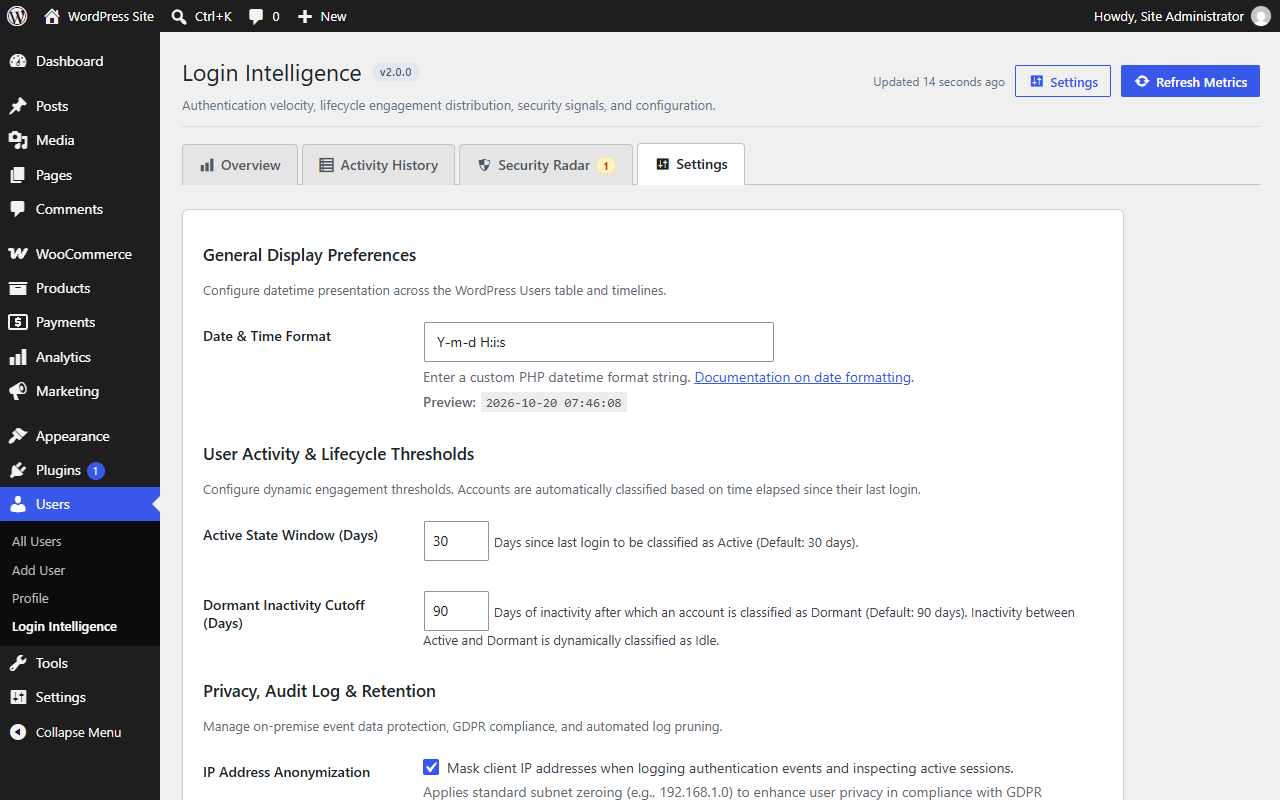
- Scheduled Maintenance: A daily WP-Cron event automatically purges activity records older than your configured retention window (default 90 days), ensuring database efficiency over time.
Privacy and Data Retention
Login Intelligence is designed with a strict privacy-first architecture:
- On-Premise Storage: All authentication events, session metadata, and configuration options reside exclusively within your WordPress installation’s MySQL/MariaDB database.
- IP Address Handling: IP addresses are recorded strictly for authentication auditing and local anomaly detection. Administrators can configure IP retention or anonymization according to their site policies.
- WordPress Core Privacy Tools: The plugin fully implements the WordPress Core Personal Data Exporter and Personal Data Eraser APIs. When an administrator fulfills a data export or erasure request, historical login events and metadata associated with that user are included or erased accordingly.
- Automated Data Pruning: An automated daily WP-Cron job prunes historical event records older than the administrator-configured retention period (default 90 days).
- Controlled Uninstall Policy: Plugin data is retained upon uninstallation by default. Site administrators have explicit control via the “Delete all plugin data when uninstalled” setting to remove the custom event table and all plugin options when desired.
Snimke zaslona
Instalacija
- Upload the
last-login-info-displayfolder to the/wp-content/plugins/directory, or install the plugin directly through the WordPress Plugins screen. - Activate the plugin through the ‘Plugins’ menu in WordPress.
- Navigate to Users Login Intelligence to view your authentication dashboard, or inspect the “Last Login” and “Login Count” columns in your Users list table.
Pitanja i odgovori
-
Where can I find the Login Intelligence Dashboard?
-
In your WordPress admin sidebar, navigate to Users Login Intelligence. Administrators can monitor login volume, review activity history, inspect active sessions, examine security signals, and configure plugin settings from this consolidated screen.
-
Does this plugin transmit data to external servers or cloud services?
-
No. Login Intelligence operates entirely on-premise within your WordPress database. No analytics, telemetry, user credentials, or IP data are ever transmitted to third-party servers.
-
Does Security Radar automatically block or lock out users?
-
No. Security Radar is strictly an observational, advisory signal system designed to provide administrators with situational awareness without risking automated lockouts of legitimate users.
-
How do I sort users by last login time or login count?
-
Navigate to Users All Users in your WordPress admin. Click on the “Last Login” or “Login Count” column headers to sort the user list in ascending or descending order.
-
What happens to my data if I deactivate or uninstall the plugin?
-
By default, deactivating or uninstalling Login Intelligence preserves all event history, login metadata, and settings so no data is lost during routine maintenance or re-installation. If you prefer to completely remove all plugin data upon uninstallation, you can enable the “Delete all plugin data when uninstalled” checkbox under Users Login Intelligence Settings.
-
Does this plugin affect site performance?
-
No. Login Intelligence is engineered for minimal overhead. Fast user metadata caching powers standard user listings, the custom event table uses indexed columns, and administrative aggregates utilize WordPress transient caching.
-
Is this plugin compatible with WordPress Multisite?
-
Yes. The plugin is fully compatible with WordPress Multisite networks, network-activated environments, and Network Admin user management screens.
Recenzije
Nema recenzija za ovaj dodatak.
Suradnici i Programeri
“Login Intelligence – User Activity & Login History” je softver otvorenog koda. Sljedeće osobe su doprinijele ovom dodatku.
Suradnici
Prevedite “Login Intelligence – User Activity & Login History” na svoj jezik.
Zainteresirani ste za razvoj?
Pregledajte kôd, pogledajte SVN spremišteili se pretplatite na dnevnik razvoja od RSS.
Dnevnik promjena
2.0.0
- Stable Release: Production-ready Login Intelligence 2.0.0 release.
- Added: Admin Menu Consolidation — unified all settings, dashboard views, activity logs, and radar tools under
Users > Login Intelligence. - Added: Tabbed Dashboard navigation with 4 dedicated tabs: Overview, Activity History, Security Radar, and Settings.
- Added: Full Activity History tab with pagination and event type filters (
user_login,login_failed,user_logout). - Added: Automatic redirection of legacy
Settings > Login Intelligencelinks to the consolidated Settings tab. - Fixed: Dashboard action buttons icon vertical alignment using centered CSS flexbox.
- Improved: Mobile responsive redesign with fluid layouts, responsive table wrappers, and touch-friendly targets for 360px–1440px viewports.
- Improved: Rating notice with 14-day threshold, meaningful usage check, 30-day snooze, and direct
#new-postreview links. - Added: Security Radar rule-based local anomaly detection (brute force surges, concurrent sessions, dormant return).
- Added: Active session monitoring and zero-fingerprinting device context parsing.
- Added: User State Engine categorizing user accounts into Active, Idle, Dormant, and Never Logged In.
- Added: Color-coded user state badges displayed in the WordPress Users admin list.
- Added: Native Users list table state filter tabs (All, Active, Idle, Dormant, Never Logged In).
- Added: Individual User Activity Timeline on user profile edit screen with deterministic keyset/cursor pagination.
- Added: “Activity History” action link to user table rows for fast timeline access.
- Added: Dedicated append-only
wp_llid_eventscustom table for historical audit logs. - Added: Synchronized dual-write login engine (fast user metadata cache + custom event table).
- Added: Event domain layer (
ActivityEvent,EventType,EventService,EventRepository). - Added: Automated daily retention pruning via WP-Cron (
RetentionEngine). - Added: Configurable uninstall data policy with “Delete all plugin data when uninstalled” setting (default OFF).
- Added: WordPress Core Personal Data Exporter and Eraser integration for custom event table rows.
- Added: Developer action hook
llid_activity_event_recorded.
1.2.0
- Improved: Modernized modular architecture with PSR-4 autoloading and domain/admin separation.
- Improved: Dedicated user meta repository and login recording service.
1.1.1
- Performance: Optimized database queries on user listings.
- Fix: Resolved column header alignment issues in WordPress admin.
1.1.0
- Feature: Added user login count tracking.
- Feature: Added sortable columns to WordPress Users screen.
1.0.0
- Initial release: Basic last login timestamp tracking for WordPress users.