Opis
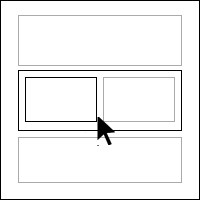
Gutenberg Full Width Editor and Blocks Border Highlight adds border and hover effects in the Gutenberg editor for easier navigation between nested blocks.
Snimke zaslona

Instalacija
The plugin is simple to install:
- Upload the plugin and activate or
- Download editor-blocks-border.zip
- Unzip
- Upload the ‘editor-blocks-border’ folder to your /wp-content/plugins directory
- Go to the plugin menu page and activate the plugin
- Go to any post and page or create new post and page to find activate/deactivate option on the right edit section.
Recenzije

09. srpnja 2021.
A long awaited feature , I was looking in Gutenberg.

09. srpnja 2021.
1 odgovor
I was relying on the EditorsKit plugin to display the borders, but this one is better, easier to see ALL the borders and the hover effect is the icing on the cake.
The only thing I changed was the color of the hover border from black to green, simply because it is more usual to have a black background in a container block, like the Cover or Group blocks, as oppose to a green background.
Thanks a lot for this !
Suradnici i Programeri
“Gutenberg Editor Full Width Blocks Border” je softver otvorenog koda. Sljedeće osobe su doprinijele ovom dodatku.
Suradnici
Prevedite “Gutenberg Editor Full Width Blocks Border” na svoj jezik.
Zainteresirani ste za razvoj?
Pregledajte kôd, pogledajte SVN spremišteili se pretplatite na dnevnik razvoja od RSS.
Dnevnik promjena
1.0.0
- Initial release
1.1.0
- Responsive Fixes